What a captive portal is. And what it costs.
The sign-in page guests meet before they get online. This guide explains the connection journey, consent workflow and current Net Intellect pricing.
You have probably used one this week
If you have ever joined the WiFi in a hotel, an airport or a chain coffee shop and a page appeared asking for your email or your room number, that page was a captive portal. It is the front door between a guest's phone and your internet connection. Until they walk through it, they are not online.
That is the concept. The useful part is what appears on that front door. Guests who join the network see it on their own device while they are in the venue, giving the business a direct, relevant place to explain the connection and offer an optional marketing choice.
How it works, step by step
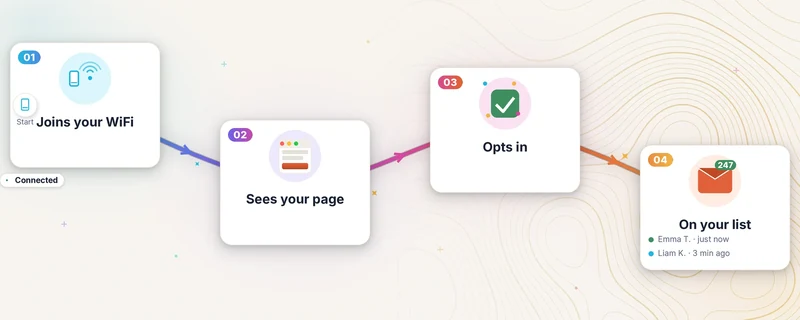
- A guest joins your guest WiFi. Their phone usually opens the sign-in page, although captive-network detection can occasionally require the guest to open it manually. No app, nothing to install.
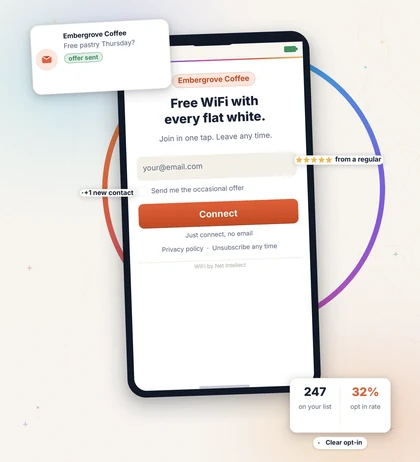
- The page asks for something small. Our portal asks for an email address with an unticked, required marketing-consent box. A clear skip-email route lets the guest connect without sharing an address.
- They tap connect. They are taken through the agreed access route. A returning device can be recognised, although privacy features such as private-address rotation mean nobody should promise it will bypass the page indefinitely.
- Behind the scenes, consented details are stored with the current consent outcome and time of the latest matching submission. This is an operational record, not an immutable event history. Opted-in records are available to the venue as a downloadable spreadsheet (CSV). A direct Mailchimp or Brevo connector can be built and acceptance-tested at customer go-live on request.
A dedicated setup can use the venue's logo, colours, tone of voice and web address. Supplier platforms vary, so compare the available design control, branding, data terms, exports and cancellation route rather than relying on the label alone.
What it is for
A portal does not make your WiFi faster. What it does is turn a cost you already pay for into something that works for the business.
A mailing list you control. When guests choose to opt in, the venue gains a low-cost owned marketing channel instead of relying entirely on social platforms. The value depends on how many people connect and whether the venue sends useful messages afterwards.
Give opted-in guests a reason to return. A venue might use the list for a quieter-day offer, an event invitation or a useful update. Whether that produces visits or revenue must be measured against the venue's own results.
Consistent venue branding. A dedicated portal can use the venue's logo, colours, wording and web address instead of a generic supplier page.
A clearer consent workflow. The portal provides tools to record the latest matching opt-in. The venue remains responsible for its consent wording, campaigns, retention and rights requests. More on that next.
The legal bit, briefly
UK GDPR and PECR both matter when personal data is used for electronic marketing. Valid consent must be freely given, specific, informed and unambiguous, and the venue should keep a record of when and how it was obtained. Other rules and limited exceptions can also apply, so the venue remains responsible for its marketing decisions. Our guide to what UK law asks of guest WiFi covers this in more detail.
In practice a portal designed to support compliance needs an unticked opt-in box, a plain note about what the guest is signing up to, a link to the privacy notice, a working marketing opt-out, and a record of the latest matching opt-in and its timestamp. This is an operational record rather than an immutable event history. The venue remains responsible for how the list is used; Net Intellect hosts the portal as its processor.
If a supplier proposes pre-ticked boxes or automatic marketing enrolment, ask them to change the consent design. Neither provides valid consent for marketing.
What it costs in the UK
Venues end up with a portal by one of three routes, and the price tags are very different.
Renting a managed platform. Some suppliers provide portal software as a recurring subscription, often with multi-site dashboards, campaign tools and support. Packages, data-processing arrangements, export rules and contract terms vary. Ask for a written quote that separates the portal, hardware, usage limits, support and any per-venue or per-contact charges. This route can suit organisations that want one supplier to manage a larger, multi-site system.
Using what is built into good kit. Business-grade equipment such as Ubiquiti UniFi includes a basic captive portal at no extra monthly cost. It works, and for a venue that just wants a branded welcome screen it can be enough. The limits show when you want the marketing side: design options are basic, and the consent record and onward list workflow are left to you.
Having one built on kit you own. This is the route we sell, so weigh our view accordingly. The sign-in page uses your web address and includes the latest matching opt-in record and a downloadable spreadsheet of opted-in guests. If a venue chooses Guest WiFi with a new Net Intellect UniFi installation, portal access and hosting are free for six months. From month 7, Portal is £19 a month, or £29 with remote network monitoring. No per-user or per-contact fees. If you request a direct Mailchimp or Brevo connection, we scope, build and acceptance-test that connector for your account at go-live; other platforms are separately scoped. The portal itself sends no marketing email.
For a suitable existing UniFi network, setup and design are £250 once, then hosting is £19/month from go-live. The six-month free offer does not apply. Projects are available to quote and book. Current prices are on the Guest WiFi page. The customer DPA, privacy wording, secure routes and acceptance checks are completed before the portal processes real guest data.
On hardware: a portal can be added only where the existing UniFi controller and guest network are compatible. We confirm what can stay, what needs configuration and whether network remediation or a visit is required before the work is agreed.
Supplier packages change, so compare written quotes on the same scope. Check the hardware, portal features, data handling, support, cancellation terms and every recurring charge rather than relying on a headline monthly figure.
Questions venue owners ask
Will it annoy my customers?
The sign-in is designed to be brief, and guests can connect without sharing an email address. A returning device may reconnect or be recognised automatically, but device privacy settings can make the page reappear, particularly when an iPhone rotates its private network address.
Do I have to send marketing?
No. A venue can use the portal purely as a branded welcome and to keep guests separate from the business network. Marketing remains optional.
What do I see about my guests?
Email address for guests who consent, the consent outcome, connection totals and summary statistics such as recent sign-ups and the access points used. We do not collect a guest’s name, and you do not see browsing history. A portal is a front door, not a periscope.
Is it legal to email people afterwards?
It can be lawful where consent is valid and the campaign complies with PECR and UK GDPR. The venue must confirm the rule and UK GDPR lawful basis that apply to its campaign.
I already have a mailing list. Does this replace it?
No. You can export consented opt-ins as a CSV today. If you want a direct Mailchimp or Brevo connection, we can scope, build and acceptance-test that connector against your account at go-live. No customer connector is currently live, and other platforms are separately scoped.
The short version
A captive portal is the sign-in page between a guest and the venue's WiFi. Supplier packages differ in design, data handling, exports, support and recurring charges. The right comparison is a written scope that covers all five, plus what happens at cancellation.
Net Intellect's current service runs on compatible UniFi networks, gives guests a skip-email route and lets the venue export opted-in records. The venue remains the data controller and decides how those records are used.
For designs, pricing and who qualifies for the six-month offer, see our Guest WiFi service.
Related guides
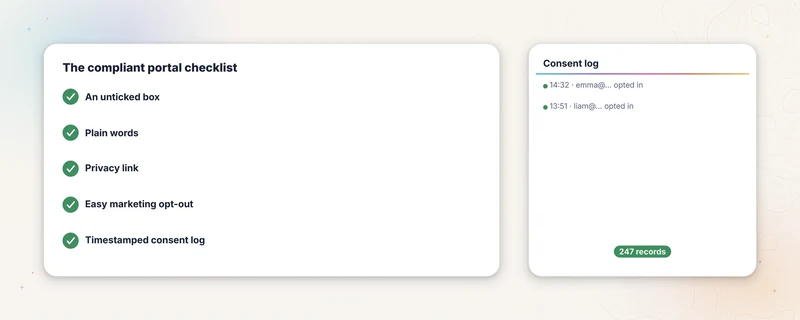
Guest WiFi and the law
What UK law asks of a venue running guest WiFi. Five practical parts of a clear consent workflow, explained in plain English by people who build the tools.
Read the guide →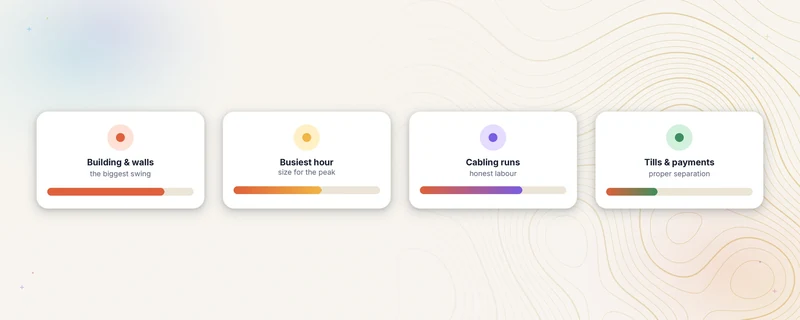
What business WiFi installation costs
Planning ranges for UK business WiFi installation, what changes the price, and why a site survey is needed before a fixed project quote.
Read the guide →See whether the portal fits your UniFi network.
Describe the controller, guest network and sign-in route you have now. We will confirm the technical fit and set out the data-processing terms.
Check the portal fit- 01Describe the current networkUniFi controller, guest WiFi and sign-in route.
- 02Confirm the fitTechnical compatibility and data-processing terms.
- 03Review the portal scopeBranding, export, hosting and exclusions in writing.