Files and shares
Capacity is selected around the business's data, users, external sharing and expected growth.
Store files, team passwords, backups and recordings on a documented system built around your workload. We specify the hardware, data locations, recovery plan and what support covers before anything is ordered.
Self-hosting can reduce reliance on per-user storage plans, but it moves responsibility onto the system owner. We design that responsibility into the project.
Capacity is selected around the business's data, users, external sharing and expected growth.
Suitable services run on customer-owned infrastructure with documented access, updates and backups.
Backup destinations, retention, recovery targets and restore tests are agreed before the build.
The customer keeps the hardware, data, credentials and documentation if managed care is cancelled.
The platform and scope are selected after discovery. Paid components, storage and support remain visible in the proposal.
Business file storage and sharing on a suitable NAS or virtual server, with user access, version retention and backup agreed. The open-source platform does not add a per-user software licence; paid components and support are separate.
Bitwarden-compatible password management using the official clients, with team collections, access controls, two-factor authentication options, backups and updates defined in the plan.
A suitable NAS, Proxmox Backup Server or named alternative. The proposal records protected workloads, destination, retention and recovery targets. A successful job is not treated as proof of recovery.
UniFi Protect work starts with a short qualification. Before quoting, we agree the recorder, cameras, purpose, placement, retention, who can view or export footage, and the customer's signage and privacy responsibilities. Recordings remain on the local UniFi recorder, and UniFi Protect does not add a per-camera software licence.
Every service needs a suitable platform. We quote the hardware, drives, UPS, configuration, migration, backup destination, initial restore test and handover before any monthly care plan begins.
TrueNAS, Unraid, UniFi UNAS and Proxmox suit different workloads. The design begins with capacity, recovery and resilience rather than a fixed bundle.
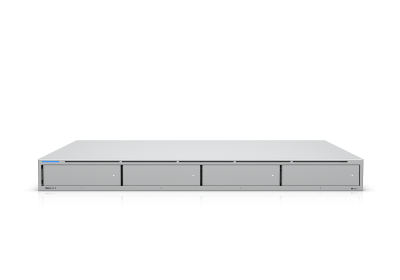
This is for an existing NAS, server or self-hosted stack that we did not build. We check administrator access, supported versions, storage health, backup history, documentation and network exposure, then confirm the assessment scope and fee before work starts. Remedial work is quoted separately, and managed care begins only after the supported baseline is recorded.
It is separate from the £250 existing-UniFi captive-portal retrofit. A new self-hosted system installed by Net Intellect does not need a separate takeover assessment because discovery and testing are included in the project.
First-party experience: Net Intellect operates a three-node Proxmox environment for Nextcloud and Vaultwarden. Each customer design still follows its own capacity, recovery and resilience requirements.
Identity, SSO and UK-only backup are quoted only when the proposal names the provider or specialist, data location, recurring charge and support owner.
The monthly fee covers only the applications, hosts and checks named in the agreement. Hardware and initial deployment are quoted separately.
Monitoring runs continuously, but human response is during business hours. We do not provide a standard 24-hour self-hosted support service. Urgent business-hours work is subject to availability and the relevant support or call-out charge. Included support time does not roll over. Hardware, replacement parts, backup storage, transfer charges, new applications, migrations, major changes, routine user support, account administration, on-site visits, paid licences and out-of-scope recovery are excluded unless the agreement says otherwise.
Plans can be cancelled with 30 days' notice. The customer keeps the hardware, data, credentials and documentation. Closing migration or extended handover work is quoted before it starts.
The final proposal names the platform, costs, data locations, recovery checks and what support covers.
Confirm workload, users, capacity, existing systems, physical location, backup destination and recovery targets.
Itemise hardware, implementation, migration, storage or supplier charges, optional care and exclusions.
Configure the platform, applications, monitoring and backup, then complete the agreed restore test.
Provide inventory, credentials, data locations, backup schedule, recovery targets and the agreed support route.
Tell us about the users, data, applications and recovery needs. We will confirm whether a NAS, one supported service or a larger Proxmox design is worth exploring.
Tell us what you need to run