UniFi’s own guest portal. Or a managed one?
The UniFi Network application includes a guest hotspot portal, and Ubiquiti’s documentation lists no separate charge. Its built-in options include passwords, vouchers and Stripe payments.
The short answer
If you want a branded welcome page, a WiFi password or vouchers that staff hand out, the portal built into UniFi is very likely enough, and Ubiquiti lists no separate charge for it. If you want to build an email list from guests who choose to join, with a proper consent box, a record of when they agreed, an export and a way to erase someone, that is where a managed portal earns its monthly fee.
What the built-in portal does
The UniFi Network application includes a hotspot portal that you can switch on for a guest WiFi network. Ubiquiti’s documentation (October 2026, Network 9 and later) lists these sign-in options, and more than one can be switched on at once:
- Password: one shared code for every guest.
- Vouchers: codes with their own expiry time, speed limit or data allowance, which suit hotels and paid access.
- Payment through Stripe: for venues that sell WiFi time.
- RADIUS: for organisations that already run their own login system.
- Facebook: still listed, although Meta closed its own Facebook Wi-Fi service in 2023, so test it before you rely on it.
- An external portal server: covered below.
You can set the welcome text, logo and colour scheme. A Hotspot Operator role lets staff manage vouchers without full administrator access. For many venues that is all they need.
Where it stops
Ubiquiti’s documentation does not describe an email field, a separate marketing-consent box, a consent record, an export of opted-in addresses or a tool to erase one guest’s details.
The built-in portal controls guest access. Collecting addresses for marketing also needs a consent and data-handling process, which our guide to guest WiFi and the law explains.
How a managed portal plugs in
UniFi has an External Portal Server option. When it is switched on, UniFi sends a new guest to an outside sign-in page, together with the details needed to identify their device. That page shows the venue’s branding and choices, records what the guest chose, and then tells UniFi to let the device online.
UniFi still decides who is allowed on, and the equipment and controller stay the venue’s. This is how our Guest WiFi portal works on a compatible UniFi network.
Side by side
| Question | UniFi built-in portal | Net Intellect managed portal |
|---|---|---|
| Extra cost | Ubiquiti lists no separate charge. | £19 a month after any free period. £250 setup on a suitable network another provider installed; setup included on networks we installed. |
| Sign-in choices | Password, vouchers, Stripe payment, RADIUS and external portal. Facebook is still listed, but whether it works today is unverified. | Email with a consent choice, or “just connect” without an email. |
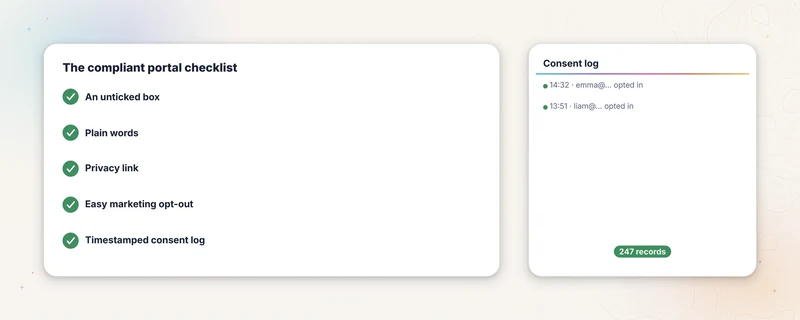
| Email list for marketing | No email field documented. | Only guests who tick an unticked consent box. |
| Consent record | Not documented. | The latest sign-up time and consent choice for each device and email address. A repeat sign-up updates it, so it is not a full consent history. |
| Export | Not documented. | A CSV of opted-in guests from the admin dashboard. |
| Erasure | Not documented. | Erase a guest’s records by email address after checking the matches. Retention rules delete older skipped and non-consenting records and clear device details from older consented ones. |
| Vouchers or paid access | Built in. | Not offered. |
| Look and feel | Logo, colours and welcome text. | The venue’s logo, colours, wording and web address, set up for you. |
| Who runs it | You, inside UniFi. | We host and maintain the sign-in page. The UniFi equipment stays yours. |
| What it depends on | Your UniFi system. | Your UniFi system and our hosted sign-in page. |
When the built-in portal is the right choice
- You want a welcome page, a password or accepted terms, and you have no plans for a mailing list.
- Staff hand out time-limited codes, or you sell WiFi access.
- You want everything inside your own UniFi console, with no outside service.
- Nobody will write to guests afterwards, so an email list would sit unused.
When a managed portal is worth paying for
A managed portal makes sense when you want an email list from guests who choose to join, with an unticked consent box, a record of when they agreed, a CSV export and a way to erase someone on request. It also suits a venue that wants the page to look like its own brand and would rather someone else kept it working.
This is the route we sell, so weigh our view accordingly. Choose Guest WiFi with a new Net Intellect UniFi installation and access and hosting are free for six months, then £19 a month, or £29 with remote network monitoring. Added later to a network we installed, setup is included and billing starts at go-live. On a suitable network another provider installed, setup and design are £250 once, then £19 a month from go-live. Current prices are on the Guest WiFi page.
Questions venue owners ask
Does UniFi guest WiFi collect email addresses?
Ubiquiti’s documentation does not describe a built-in email field. Venues that want email sign-ups usually connect an external portal through UniFi’s External Portal Server option.
Do I have to replace my UniFi equipment?
No. A managed portal works with a compatible UniFi controller and guest network that you keep. We check compatibility first and tell you if anything needs configuring.
Can I email guests who sign in?
Only those who opted in. Our guide to guest WiFi and the law explains why connecting to the WiFi is not consent to marketing.
Related guides
Guest WiFi and the law
What UK law asks of a venue running guest WiFi. Five practical parts of a clear consent workflow, explained in plain English by people who build the tools.
Read the guide →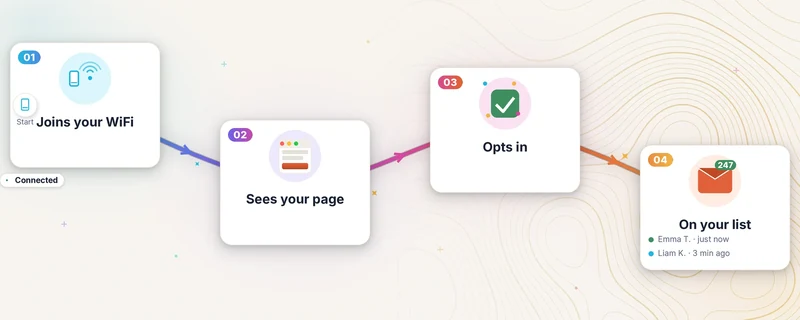
What a captive portal is (and what it costs)
The sign-in page between guests and the venue WiFi: how it works, consent basics and current UK pricing.
Read the guide →See whether the portal fits your UniFi network.
Describe the controller, guest network and sign-in route you have now. We will confirm the technical fit and set out the data-processing terms.
Check the portal fit- 01Describe the current networkUniFi controller, guest WiFi and sign-in route.
- 02Confirm the fitTechnical compatibility and data-processing terms.
- 03Review the portal scopeBranding, export, hosting and exclusions in writing.